With the world transforming rapidly, new technology is evolving each day and making our lives much easier. Likewise, managing loads of data, information, digits via manual efforts was not the most convenient and organized method. Manual data handling is undoubtedly an outdated method with limited facilities. Let’s not forget about the time and effort wasted to insert and rewrite the data wherever required and other such issues. Therefore, in this era of digitalization and computing, artificial intelligence is the key to survival in a better manner. And a spreadsheet management software does the job entirely!
There are numerous facilities and features you can avail of if you switch from manual data entry to such software since these are loaded with technologies that provide instant, accurate results. This software is a staple at every desktop because of its impeccable power of making complex tasks extraordinarily convenient and easy. According to Statista, people of almost all education levels of Finland use software like these daily, and 71% of the people are mostly from higher and tertiary education.

Source: Statisa.com
Therefore, spreadsheet management software is extremely helpful in day-to-day lives of any professional. Fortunately, most of us would probably already know about the basic features of it. Therefore, let’s jump on to some selected tips and tricks that will help you make the most out of the spreadsheet management software. Let’s get started.
Conditional Formatting
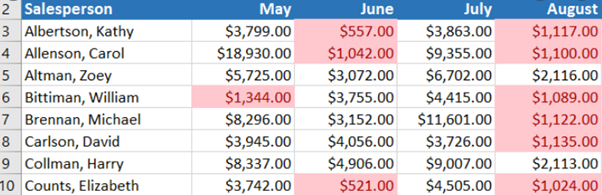
Numerous data all together in the spreadsheet can be highly confusing, and therefore, conditional formatting can be extremely helpful here. Conditional formatting is nothing but basically the method to visually explore and identify the data’s patterns and trends, which will help bring out a sense of the entire row or column.
Conditional formatting in the spreadsheet project management will help in highlighting the high priority cells, emphasise the unusual values wherever required and even visualize the entire data by using various data bars, color scales that correspond to various variations in the data of the spreadsheet. It changes the appearance of the cells according to your conditions and the requirements that you specify. If the mentioned conditions are true, the cell range would be formatted, and if not, then the cell range would be the same. Likewise, you can also include formulas as well to evaluate.
Source: GCF
Pivot Tables
Just arranging the data and digits by conditional formatting is surely not enough. There could be many other important tasks that you might want to do with these data and pivot table is the next best thing.
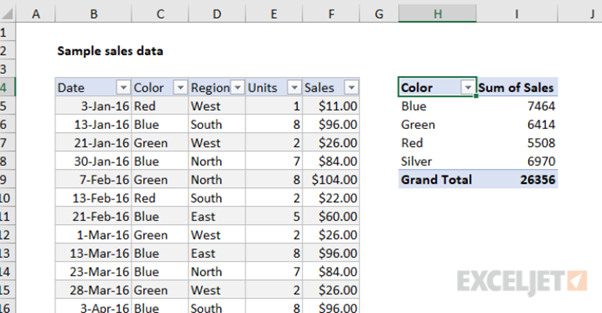
A pivot table is basically used to summarize, sort, reorganize, group, count, and total, and the list is endless. It allows us to transform the columns into rows and vice versa as well. It will also help in using advanced calculations on any specific rows or columns without any hassle.
Source: https://exceljet.net/
Flash Fill
When you insert data and information, it is quite inevitable that a few rows or columns might have a specific pattern or trend to it. Now, why would you even waste time filling up the same repetitive data over and over again in each cell? That is undoubtedly frustrating in the long run. Fortunately, flash filling is one such method that can ease this entire process and make it completely swift and seamless. There are various spreadsheet management templates for these as well.
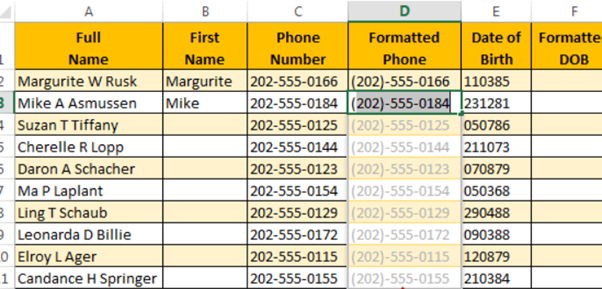
The flash fill feature basically means that it will recognize the given data’s patterns and trends and then automatically fill the rest cells in the same manner. Suppose if you want to fill a few names and email ids in two separate columns, just ill the first column by yourself, and the second column would be filled automatically and instantly. This way, the entire process becomes extremely quick and does the job with the least effort.
Source: TECHWELK.IN
Index match
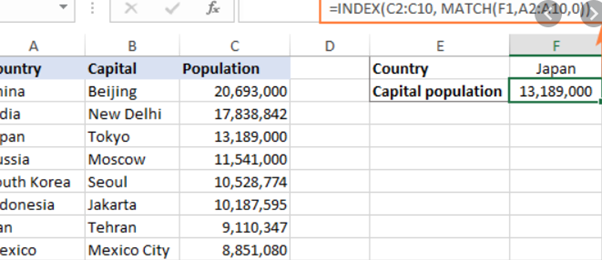
This is another powerful feature of the spreadsheet management software, which is highly potent and capable of involving many combinations in the function. If you have a massive table of data and information and want to look up for a specific value in that lot and return a corresponding value, this is your savior. Suppose you have an organization with approximately 1000 employees. A specific spreadsheet consists of all their data and information like salary, dates, etc. Still, you basically just want to view 20 of them since you would require them for a separate task. Now how will you filter them out without manual entry? Simple. Index matching will lookup for the employees’ value, which is unique, and returns the required information for you. This way, you can get your required slot of data within seconds.
Source: ablebits.com
Charts
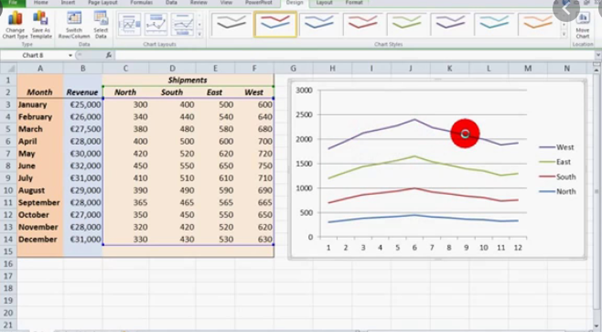
As mentioned earlier, visual representation is the key to everything. Visual representations make every complex thing extremely simple, and therefore, using diagrams, charts, and many more can help in better representation and arrangement of the data. The best part of spreadsheet management software like these is that you can easily add multiple charts, tables, and other such diagrams with no hassle. This is extremely helpful in distinguishing between comparatively different values and helps to analyze the statistics in a better manner. You can also edit the style of the chart or diagram as per your requirements. Explore what suits you and use accordingly.
Source: YouTube
Final Thoughts
Aren’t these features highly interesting and useful for our everyday lives? These few simple implementations can help you make the most out of spreadsheet management software with utmost efficiency. Spreadsheet management is surely not the toughest part if you know the right tricks. These are excellent for beginners as well as advanced people irrespective of age. Furthermore, with such amazing steps, you can easily enhance the entire sheet and make it look much more presentable and eye-catching, which will surely give an edge over others. Therefore, don’t wait any further and implement a few of these tricks today itself and make the most out of spreadsheet management software.
Leave a Reply